This post may contain affiliate links. If you click on these links and make a purchase, I may earn a small commission at no extra cost to you. I only recommend products I believe provide value. Thank you.
Portable laptop screen extenders are everywhere right now, but many of them look identical online, making it hard to know which ones are actually worth buying. I tested this Rizpak One Cable Laptop Screen Extender to see whether the one-cable setup really makes life easier or if it’s just another overhyped gadget. Here’s my honest experience after real daily use
Table of Contents
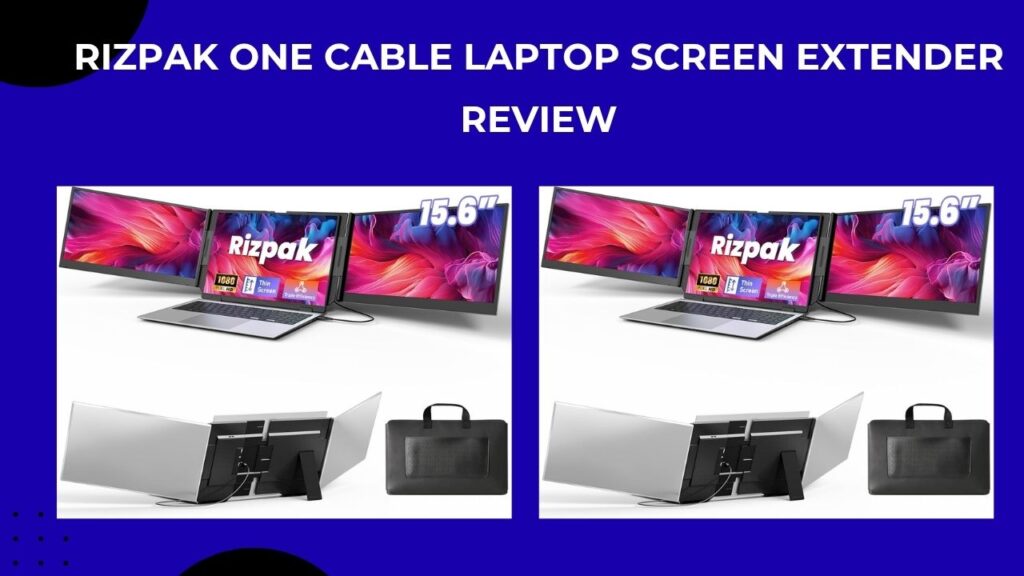
Rizpak One Cable Laptop Screen Extender Review After 2 Weeks of Daily Use
I’ve been using this Rizpak One Cable Laptop Screen Extendert for the past two weeks during my normal workdays, and I’ll admit it made a bigger difference to my workflow than I expected. I usually work with dozens of tabs open, edit images, reply to emails, and jump between meetings all day, so working from a single laptop screen always felt cramped.
What first caught my attention about this extender was the “one cable” setup. A lot of portable monitors claim to be simple, but end up needing extra adapters or messy wiring. Thankfully, this one was much easier to set up than I expected.
The dual 15.6-inch screens give you a full triple-monitor setup without needing a bulky desk monitor at home. After using it daily, I can honestly say it helped me stay more organized while working, especially when multitasking. I could keep research on one screen, writing tools on another, and Zoom or Slack open on the side instead of constantly switching windows.
That said, it’s not completely perfect. The extra screens do add some weight to your laptop setup, so if you move around a lot while working in cafés or tight spaces, you’ll definitely notice it. I also found that the stand takes a little adjusting at first to get everything balanced properly.
Should You Buy It?
If you regularly work from a laptop and feel limited by a single screen, I do think it’s worth considering. It feels especially useful for remote workers, students, programmers, traders, and anyone who multitasks heavily during the day.
But if you mostly use your laptop for casual browsing or short tasks, the setup may feel like overkill. This is more of a productivity tool than a casual accessory.
Unboxing and First Impressions
The first thing I noticed after opening the box was that everything felt surprisingly well packed. The carrying case gives it a more premium feel, and I liked that Rizpak included the cables and accessories needed to get started right away instead of making me buy extras separately.
The screens themselves have a clean matte black finish that looks modern without feeling cheap. Setup only took me a few minutes. I connected the main cable to my laptop, adjusted the screens, installed the driver, and everything was working shortly after.
The display quality also looked sharper than I expected for portable screens. Text was clear, colors looked decent for everyday work, and watching videos during breaks actually felt enjoyable.
Standout Features
This Rizpak one cable laptop screen extender shines with its true one-cable connection via USB-C or USB-A, powering two additional 15.6-inch 1080P FHD IPS screens after a simple driver install, compatible with 13-17.3-inch laptops running Windows, macOS, Android, Chrome OS, or Linux. The ultra-slim 0.2-inch panels offer 100% sRGB color accuracy and 178° viewing angles for vibrant, distortion-free visuals ideal for design work or presentations, all housed in lightweight 4-pound aerospace-grade aluminum that dissipates heat effectively. An independent stand adjusts for stability without stressing your laptop hinge, and it folds into a carrying case for travel, expanding your workspace up to three times over.
Setup and Compatibility
Connection is brilliantly simple: one USB-C/USB-A cable handles video, power, and data, reducing desk clutter dramatically compared to multi-cable extenders I’ve tried before. It auto-detects on most laptops (MacBook Pro M3, Dell XPS, even Android tablets), though initial driver setup ensures full 1080P@60Hz performance—plug the PD adapter for peak brightness to avoid dimming. No compatibility headaches across OSes; screens extend or mirror effortlessly, with flexible positioning (side-by-side or stacked) via drag-and-drop in display settings.
Display Quality and Performance
The IPS panels deliver sharp 1920×1080 visuals with excellent color reproduction—editing photos in Lightroom looked true-to-life, and coding in VS Code across three screens cut my alt-tabbing by 80%. Brightness hits 300 nits for well-lit offices, and the wide angles mean collaborators see the same clarity without hunching. Refresh is smooth at 60Hz for productivity, though not for gaming; multitasking spreadsheets, browsers, and Slack feels like a native desktop.
Build Quality and Portability
Crafted from reinforced aluminum, it withstands daily folds without wobble, and the adjustable back panel fits snugly on laptops from 13 to 17.3 inches without lid pressure. At 4 lbs total, it’s travel-ready—slips into my backpack alongside my 14-inch laptop, setting up on planes or coffee shops in seconds to mimic my home office. Heat stays minimal even after hours, thanks to the alloy’s dissipation, far outperforming plastic rivals that warp or overheat.
How I Used It Daily
Most of my use was for remote work and content writing. I usually had:
- My browser and research tabs on the left screen
- Google Docs or WordPress in the center
- Email, WhatsApp, or meetings on the right
This setup genuinely reduced the constant back-and-forth window switching that slows me down during work.
I also tested it during light video editing sessions, and having the timeline on one screen while previewing footage on another was really convenient. One thing I appreciated is how portable the whole setup is compared to carrying separate monitors. It’s still not ultra-lightweight, but it’s far easier than packing a traditional monitor.
What Customers Love Most
Users rave about the instant productivity surge, with many saying it “feels like having three computers in one” for remote setups. The lightweight portability earns high marks from frequent flyers who pack it effortlessly, while the vibrant colors and sharp FHD impress creators tired of blurry budget extenders. Setup ease stands out—one-cable magic eliminates cable salads, and the sturdy stand prevents tipping during adjustments.
Minor Drawbacks Addressed
A few note initial driver install as a one-time hurdle, but it’s straightforward and unlocks full potential. Brightness could push higher for direct sunlight (use indoors or shaded), and it’s not for gamers needing 4K/120Hz. These are minor against rivals’ bulkier designs or finicky connections—plug in the PD adapter, and stability shines.
Comparison to Alternatives
| Feature | Rizpak One Cable | Typical Dual-Screen Extender | Traditional Portable Monitor |
|---|---|---|---|
| Screens Added | 2 (triple total) | 1 (dual total) | 1 (dual total) |
| Cable Needs | 1 (USB-C/A) | 2+ cables | 2 (HDMI + power) |
| Weight | 4 lbs | 3-5 lbs | 2 lbs (single) |
| Thickness | 0.2 inches | 0.4 inches | 0.3 inches |
| Stand Type | Independent aluminum | Laptop-hanging plastic | Foldable kickstand |
| Price Value | High (productivity boost) | Medium | Low (limited expansion) |
Why Choose Rizpak One Cable Laptop Screen Extender
The biggest reason is convenience. The one-cable design keeps the setup cleaner and less frustrating than many portable monitor setups I’ve tried before. I also think it appeals to people who travel often or work remotely because it gives you a desktop-style workspace almost anywhere. After using it for two weeks, going back to a single laptop screen honestly felt restrictive again.
Final Thoughts
After daily use, I can say this Rizpak One Cable Laptop Screen Extender actually lives up to most of the hype. It’s practical, easy to use, and genuinely improves productivity if your work depends on multitasking.
It does have a few downsides, like added weight and the need for enough desk space, but overall, my experience has been positive. I wouldn’t call it a must-have for everyone, but for serious laptop users, it can make work a lot more comfortable and efficient.