This post may contain affiliate links. If you click on these links and make a purchase, I may earn a small commission at no extra cost to you. I only recommend products I believe provide value. Thank you.
OLED gaming monitors are everywhere right now, but not all of them feel worth the premium price. After spending time with MSI MAG 272QP QD-OLED X24 gaming monitor, I quickly understood why gamers are excited about it. The motion clarity is incredibly smooth, colors look vibrant without appearing oversaturated, and HDR gaming feels far more immersive than standard IPS displays. Still, this monitor is not perfect. There are a few compromises that buyers should know before spending their money, especially if you plan to use it for both gaming and everyday productivity.
Table of Contents
MSI MAG 272QP QD-OLED X24 Review: My Honest Thoughts After Gaming on It
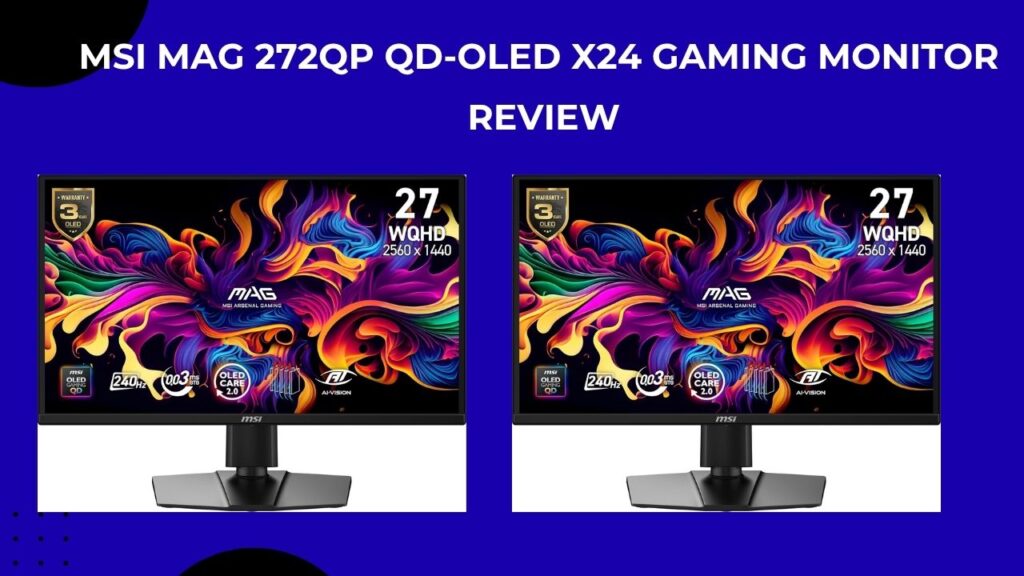
MSI MAG 272QP QD-OLED X24 is one of those gaming monitors that immediately grabs your attention once you start using it. On paper, the specs already sound impressive like a 27-inch 1440p QD-OLED panel, 240Hz refresh rate, and an ultra-fast response time aimed at competitive gamers. But specs only tell part of the story. After spending time gaming, watching content, and using it daily, I can honestly say this monitor feels more focused on real gaming experience than just throwing flashy numbers on a product page.
The first thing I noticed was how different the image quality feels compared to a normal IPS display. The blacks look genuinely deep instead of that slightly gray look you often see on LCD panels, and colors have a richer, more vibrant appearance without looking overly exaggerated. Games with darker environments especially benefit from this. In titles like horror games or cinematic single-player games, shadows and highlights look much cleaner, and smaller details are easier to spot without the image feeling washed out.
For competitive gaming, the speed is obviously a huge selling point. The 240Hz refresh rate combined with the OLED response time makes motion look incredibly smooth during fast movement. In shooters and racing games, everything feels sharp and responsive, especially when quickly flicking between targets or tracking movement on screen. It’s one of those monitors where going back to a slower panel afterward becomes very noticeable.
What I personally like most about this monitor is that MSI didn’t try to overcomplicate it. Instead of chasing 4K at the expense of performance, this sticks with the 27-inch 1440p setup that many gamers still consider the sweet spot. The resolution looks sharp enough for everyday use and gaming, but it’s also much easier to run at high frame rates compared to 4K OLED displays that demand a much more powerful GPU.
That said, I don’t think this is the perfect monitor for everyone. If most of your time is spent browsing, office work, or casual gaming, the premium price can feel hard to justify. OLED panels also still work best in rooms where you can control lighting a bit, since reflections and brightness limitations are more noticeable compared to some brighter Mini-LED displays. And while MSI includes OLED care features, long-term burn-in concerns are still something cautious buyers will probably think about before spending this much.
Still, for gamers who mainly care about smooth gameplay, fast response times, and that OLED-level picture quality, the MSI MAG 272QP QD-OLED X24 feels more like a monitor you buy for the experience rather than just the specifications. After using it, it’s easy to understand why so many gamers are moving toward OLED panels despite the higher price.
Standout features that make this monitor special
1. QD‑OLED panel: blacks, contrast, and color
At the heart of the MSI MAG 272QP X24 is a QD‑OLED panel, which combines the inky blacks of OLED with quantum‑dot color enhancement. The result is:
- Truly black backgrounds instead of slightly gray LCD blacks, which significantly boosts perceived contrast.
- Deep shadow detail in darker scenes, so you’re not losing enemies hiding in corners or foliage.
- Wide color coverage that makes landscapes, UIs, and even desktop icons look more vivid and lifelike.
Out of the box, many users report that the display feels “punchy” and cinema‑like, whether they’re playing games, watching movies, or scrolling through photos. The 240 Hz refresh and low sample‑and‑hold blur also mean that even in darker scenes, motion doesn’t feel smeared or washed out.
2. 240 Hz refresh and 0.03 ms responsiveness
The 240 Hz refresh rate paired with 0.03 ms (gray‑to‑gray) response time is one of the main reasons this monitor keeps coming up in competitive gaming setups. First‑person shooters, battle‑royales, and fast‑action titles feel incredibly smooth, with:
- Minimal motion blur, so quick flicks and head‑turns stay crisp.
- Reduced perceived lag between input and on‑screen movement, which is especially noticeable with high‑frame‑rate GPUs (RTX 30/40/50 series or equivalent).
- A very “snappy” feel for mouse movement, UI navigation, and even general desktop use.
Users who play titles like Counter‑Strike, Apex Legends, Valorant, Overwatch, or Warzone often mention that going back to 60 Hz or 144 Hz after using this monitor feels like a downgrade.
3. VESA ClearMR 13000 certification and motion clarity
The VESA ClearMR 13000 rating means this monitor has been tested and tuned for very high motion clarity, which is a big deal for fast‑paced games. What buyers tend to notice in practice is:
- Little to no obvious motion blur or “smearing” behind fast‑moving objects.
- Cleaner, more defined edges on moving characters, vehicles, and projectiles.
- A more stable, less jittery feel overall, even at very high frame rates.
In real‑world use, this translates into fewer situations where you miss targets because motion looks “sloppy” or hard to follow.
4. Build quality and ergonomics
The MSI MAG 272QP QD‑OLED X24 sits on an arm that gives you height adjustment, tilt, swivel, and pivot, letting you dial in a comfortable viewing angle for both gaming and productivity. The stand is solid enough to feel premium, and the screen is relatively compact (around 26.5 inches diagonally), so it doesn’t dominate a desk the way a 32‑inch monitor can.
From a usability standpoint, this size is often praised by long‑term users because:
- It forces you into a slightly closer, more engaged viewing distance that suits competitive gaming.
- You get plenty of screen real estate without sacrificing refresh rate or pixel response.
- The monitor looks sleek and modern, with MSI’s subtle RGB lighting and minimal bezel design adding to the “gaming‑station centerpiece” vibe.
5. Connectivity and HDR support
The monitor includes DisplayPort 1.4a and HDMI 2.1 inputs, which are essential if you want to:
- Run 1440p at 240 Hz with a modern GPU.
- Connect modern consoles (like PS5 or Xbox Series X|S) at high refresh rates and support higher‑resolution modes.
- Use HDR‑capable content from games, streaming, or local media.
The panel supports HDR with true‑black OLED characteristics, so highlights in bright scenes tend to stand out against deep blacks, giving a more cinematic feel than standard SDR displays. Many users say that once they get used to the HDR look, going back to a regular LCD feels flat and less dynamic.
6. Burn‑in protection and panel longevity
OLED enthusiasts often worry about burn‑in, especially with static UIs and HUDs. MSI’s implementation on this model includes:
- Pixel‑shifting and panel‑care features that slightly move the image over time to avoid static‑image burn‑in.
- Adjustments to how the panel ramps up brightness and handles static elements, which many long‑term users report as helping the monitor age without noticeable artifacts.
Users who have run this display for several months often mention that they haven’t seen any visible burn‑in, even when using it for long gaming sessions or mixed gaming/productivity.
Why customers consistently praise this monitor
In real‑world feedback, owners of the MAG 272QP QD‑OLED X24 tend to highlight the same core strengths again and again:
- “The blacks are insane”: Many describe the jump from a 1080p or 1440p LCD to this QD‑OLED panel as a “night‑and‑day” experience, especially in dark‑room setups.
- “Everything feels smoother”: The combination of 240 Hz, near‑instant response time, and good motion clarity makes both fast‑paced games and casual scrolling feel fluid and effortless.
- “Color and contrast are outstanding”: Users frequently mention that movies, shows, and games look more cinematic, with colors that “pop” without feeling oversaturated.
- “Compact but immersive”: The 27‑inch size is praised as a sweet spot: close enough to feel immersive, but not so big that it hurts perceived sharpness or overwhelms a typical desk.
A few also bring up the monitor’s flexible stand and clean rear design, saying it looks great mounted on a dual‑arm setup or paired with a matching RGB‑heavy PC build.
What could be better (and who should hesitate)
Despite its strengths, this monitor isn’t a perfect fit for every use case. A few recurring themes in user experiences are:
- Ambient‑light handling: In very bright rooms, the glossy panel can produce reflections and glare, and the peak brightness isn’t as high as some high‑end mini‑LED or IPS HDR setups. Owners who keep their desks near windows often say they prefer to dim the room or use bias lighting to reduce reflections.
- Text and productivity use: Some users report that text at 1440p on OLED can feel a bit softer or “fuzzy” compared with a matte IPS panel, especially if you’re doing a lot of coding or document work. This is more of a subjective preference than a dealbreaker, but it’s something to keep in mind if you’re mainly using the PC for work.
- Price positioning: While the MAG 272QP QD‑OLED X24 is often seen as a value‑oriented QD‑OLED, it still costs more than many 1440p LCD gaming monitors. If you’re on a tight budget and don’t care about OLED contrast, an IPS or VA panel might give you similar refresh rates for less money.
Should you buy the MSI MAG 272QP QD‑OLED X24?
This monitor is very likely a good fit if:
- You care more about image quality and motion clarity than absolute maximum brightness.
- You mostly game (or watch media) in a dim or dark room.
- You play fast‑paced titles that benefit from 240 Hz and extremely low response time.
- You want a 27‑inch 1440p screen that feels detailed but still very responsive.
For that kind of user, the MSI MAG 272QP QD‑OLED X24feels like a premium upgrade: the kind of monitor that makes older LCDs feel immediately dated, and that stays “future‑proof” for several years of high‑frame‑rate gaming. If, instead, you’re mostly in bright daylight, prioritize text clarity above all, or are on a strict budget, you might want to balance this OLED against a high‑quality IPS or mini‑LED panel.
All in all, the MSI MAG 272QP QD‑OLED X24 stands out as one of the more compelling 27‑inch gaming OLEDs on the market right now—offering a rare mix of speed, contrast, and color that genuinely changes how your games look and feel. If you’re ready to invest in a monitor that feels like a centerpiece rather than just a display, it’s a purchase that’s easy to justify.